It’s 2026 and people are still searching for answers on the Raspberry Pi 5 vs Raspberry Pi 4.. Well, the Pi 5 release was the biggest generational leap in Raspberry Pi’s history. That said, the Pi 4 is cheaper, and still very capable. So is the Pi 5 actually worth upgrading to, or is the Pi 4 still the smarter buy in the current economy? Through many hours of benchmarking, that’s the question I hope to help you with today!
Throughout this comparison I’ll reference my full Raspberry Pi 5 review and my guide on how to power the Raspberry Pi 5. You can also see the two boards measured head-to-head on sbc.compare’s Raspberry Pi 4 vs Pi 5 page.
Table of Contents
Raspberry Pi 5 vs Raspberry Pi 4: The Short Answer
Realistically? The Raspberry Pi 5 is 2-3x faster than the Pi 4, it adds PCIe support for NVMe, AI accelerators, and whatever else you can think of via HATs/adapters, and it’s overall a more capable machine. That said, it costs more, and it needs active cooling to really get the best of it. If you’re not chasing the fastest storage speeds, and you’re just getting to grips with Linux and SBCs as a whole, stick with the Pi 4. If you don’t mind splashing a bit more money and have. a use case that requires it, then the Pi 5 will be more powerful, and better value overall.
Raspberry Pi 5 vs Raspberry Pi 4 – Specifications
| Processor | Raspberry Pi 4 2GB | Raspberry Pi 5 2GB |
| SoC | Broadcom BCM2711 | Broadcom BCM2712 |
| CPU | 4× Cortex-A72 @ 1.5GHz | 4× Cortex-A76 @ 2.4GHz |
| GPU | VideoCore VI | VideoCore VII |
| Memory & Storage | ||
| RAM | 2GB LPDDR4 | 2GB LPDDR4X |
| Storage | microSD | microSD |
| Connectivity | ||
| Ethernet | 1GbE · PoE: via HAT | 1GbE · PoE: via HAT |
| WiFi | 802.11ac | 802.11ac |
| USB | 2× USB 2.0 USB-A, 2× USB 3.0 USB-A | 2× USB 2.0 USB-A, 2× USB 3.0 USB-A |
| General | ||
| Launched | Jun 2019 | Oct 2023 |
| Price | $49.45 | $55.00 |
What Actually Changed Between the Pi 4 and Pi 5
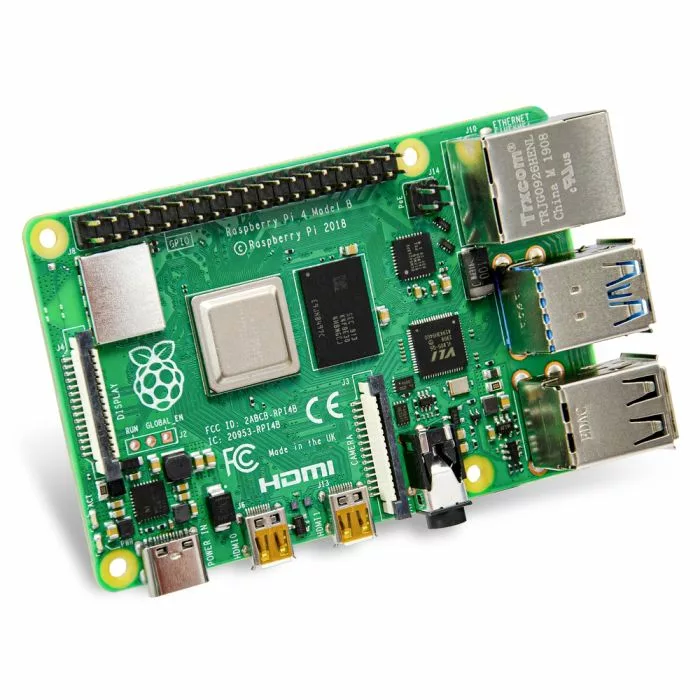
- The 4 1.8GHz Cortex-A72 CPU cores make way for 4 2.4GHz Cortex-A76 ones, a massive boost
- Introduction of the RP1 southbridge that handles faster USB options, along with other I/O
- PCIe 2.0 x1 (capable of Gen 3 speeds too!) for much faster accessories that don’t rely on USB
- A power button (finally!) so you can stop yanking out the power cables
- On-board Real Time Clock (RTC) to retain time between boots where NTP isn’t available
CPU Performance: How Much Faster Is the Pi 5?
To be blunt, it’s faster. Much faster. How much faster? 2-3x faster in most of the tests!
This translates to a much better desktop feeling if that’s your poison, or just an overall much better experience. Extracting/compressing files is going to be faster, and applications are going to feel a lot more responsive.
Geekbench 6

7-Zip Benchmark
PassMark PerformanceTest
Full CPU benchmark data: Raspberry Pi 4 on sbc.compare and the Raspberry Pi 5 8GB.
Graphics & 4K Video
Whilst not the most perfect of benchmarks, GLMark2 gives us a rough idea of the performance improvement between the 2 boards’ GPUs, the VideoCore VII and VI, and we’ve tested at both 1080p and 4K to see just how great 4K is (given the Pi 5 is heavily marketed with the 2 4K60 HDMI ports). Note, I didn’t have data for the 2GB model at the time of publishing, so I’ve compared the 8GB model. There will be a slight difference here, so take it with a pinch of salt, but this will be updated with the 2GB model data once ready.
GLMark2 (OpenGL ES)
If you’re curious how this matches up to the rest of the boards I’ve tested GLMark2 on, the full set of OpenGL ES results is on sbc.compare too.
Storage & Connectivity: The Biggest Practical Upgrade
Arguably this is one of the biggest reasons for people to upgrade from a Pi 4 to a Pi 5. I used to use a SATA SSD over USB on my Pi 4 as its boot disk and hey, it was great, and it worked. It took up a lot of space though. Now? I just have a small HAT on top of the Pi that connects via its PCIe connection et voila, if I run at Gen 3 speeds I have 800MB/s available to me.
Storage Performance (FIO)
As you can see, the microSD numbers are slightly better in some places, and much better in others (the Random Read/Write numbers are the ones to look at for the most part) so if you’re planning to just use a microSD card on your Raspberry Pi 5 then you’re still going to be in for an upgrade.
Throw in an M.2 NVMe HAT, however, along with a decent-enough Gen 3 NVMe SSD and you’re going to have a great experience. Assuming you were smart enough to buy one before pricing went through the roof.
Related reading: my guide to USB boot on the Raspberry Pi 5 and the best operating systems for the Pi 5.
Power Consumption & Thermals
Here’s where the Pi 5 doesn’t do so well, depending on how you frame it. Those faster CPU cores don’t appear out of thin air, they need some juice, and some juice they get. Raspberry Pi brought out a new 27W PSU (and later, a 45W model) with the Pi 5, along with the Active Cooler. These are indications that they knew the Pi 5 was going to be a toasty lil guy, and wanted to make sure they handled it off the bat.
Power Consumption
At launch, the Pi 5 was pulling around 4.84 watts at idle versus just 2.44 watts on the Pi 4 — roughly double. That extra power has to go somewhere, and it shows up as heat. The Pi 4’s lower draw keeps it cooler and far less likely to hit thermal throttling; the Pi 5, on the other hand, gets toasty in a hurry. Let’s take a quick look at that though!
Raspberry Pi 4 Thermal Profile
The Pi 4 with no cooling gets hot, but it doesn’t throttle. It remained at its target frequencies.
Raspberry Pi 5 Thermal Profile
The Pi 5 on the other hand quickly gets up to throttling temperatures, and we drop down to 1.5GHz for a lot of the test.
See my full breakdown in how to power the Raspberry Pi 5.
Price & Value: Which Is the Smarter Buy?
If we compare how much it costs to get up and running with a base setup, the Pi 4 is about $26 cheaper, or in percentage terms, to get a Pi 5 base setup, you’re paying around 31% more.
If you’re able to afford that 31% difference, you’re unlocking potential performance improvements of 200-300% (depending on the tests and conditions), so the Raspberry Pi 5 is the obvious value choice here, but that’s not always the deciding factor.
If you don’t need the power of a Pi 5, and you’re running something that may need to draw less power, such as a solar or battery-backed deployment, then the Pi 4 saves you on the initial outlay, and on your power budget down the line.
| Cost to get running | Raspberry Pi 4 | Raspberry Pi 5 |
|---|---|---|
| Board | $55 | $65 |
| Power supply | $8 | $12.95 |
| Cooling | N/A | $10.95 |
| Storage (32GB official microSD) | $19.95 | $19.95 |
| Approx. total | $82.95 | $108.85 |
Raspberry Pi 5: 4GB or 8GB?
If you’ve decided on the Pi 5 and you’re trying to figure out which model to go for, take a quick look at the performance benchmarks between the 2GB, 4GB, and 8GB models below. There really isn’t too much in it. If it’s a single-threaded workload then you’re going to be seeing near identical performance on each of them. The 2GB RAM option is going to slip behind in all core tests sometimes as much as 10%, but all in all, it’s not massive.
Geekbench 6
7-Zip Benchmark
PassMark PerformanceTest
So, Should You Upgrade From the Pi 4 to the Pi 5?
- Upgrade to the Pi 5 if you want NVMe/SSD speed, run a desktop, do heavy emulation, experiment with local AI, or need the extra CPU headroom for servers and containers.
- Stick with the Pi 4 if you run light services, GPIO/electronics projects, need low power draw and passive cooling, are on a budget, or already own a Pi 4 case and PSU.
Frequently Asked Questions
Is the Raspberry Pi 5 twice as fast as the Pi 4?
In a lot of cases, yes, and in some, more than twice!
Will my Raspberry Pi 4 case or HATs fit the Pi 5?
I’m afraid the cases are unlikely to fit due to component placement, but most HATs using the Pi standard GPIO layout should work just fine. Read more about these in my Raspberry Pi 5 FAQ.
Does the Raspberry Pi 5 use more power than the Pi 4?
Yes, it uses at times more than double the power of the Raspberry Pi 4.
Is the Raspberry Pi 5 worth it for beginners?
Absolutely! If you want the extra power to be more future-proofed and allow yourself more headroom for Docker containers, vibe coded apps, and whatever else the cool kids are doing these days, the Pi 5 is definitely worth it.
The Verdict
If you’re not focusing solely on pricing, the Pi 5 is the best value option, and has an amazing wealth of accessories thanks to its PCIe connection. Want 2.5Gbit Ethernet? You got it, your Pi 5 is now a capable router! Mobile data modem? You got it. There’s something for nearly every use case these days.
That said, the Pi 4 still has its place, and at a lower cost, and a lower power budget, it performs admirably. It will all come down to your use case and personal situation. If you need a bit of guidance, feel free to leave a comment below, and I, or another friendly individual will come along and lend a hand!
Want to dig into every metric side by side? See the full Raspberry Pi 4 vs Raspberry Pi 5 comparison on SBC Compare.
